Best Practices for AI-Powered Appointment Scheduling
Best Practices for AI-Powered Appointment Scheduling
AI-powered appointment scheduling is transforming how businesses handle bookings by saving time, reducing errors, and improving customer satisfaction. Here’s why it matters and how to implement it effectively:
- Missed Opportunities: Businesses lose up to 74.1% of calls that go unanswered, costing small businesses an estimated $50,400 annually.
- 24/7 Availability: AI tools allow clients to book appointments anytime, eliminating reliance on office hours and voicemail.
- Reduced No-Shows: Automated reminders via SMS or email can lower no-show rates by 30% to 50%.
- Efficiency Boost: Businesses using AI scheduling report a 90% reduction in coordination time and a 60% cut in operational costs.
To get started:
- Analyze Your Current Process: Identify bottlenecks, response delays, and no-show trends.
- Select the Right Tool: Choose AI schedulers that integrate with platforms like Google Calendar, CRMs, and MLS databases.
- Set Up Notifications: Automate confirmations and reminders to ensure clients stay informed.
- Monitor Metrics: Track booking rates, no-shows, and after-hours activity to refine your approach.
AI scheduling not only simplifies operations but also enhances client interactions, helping businesses secure more leads and reduce missed opportunities. Implementing the right tools and strategies today ensures you stay competitive in a fast-paced market.
::: @figure 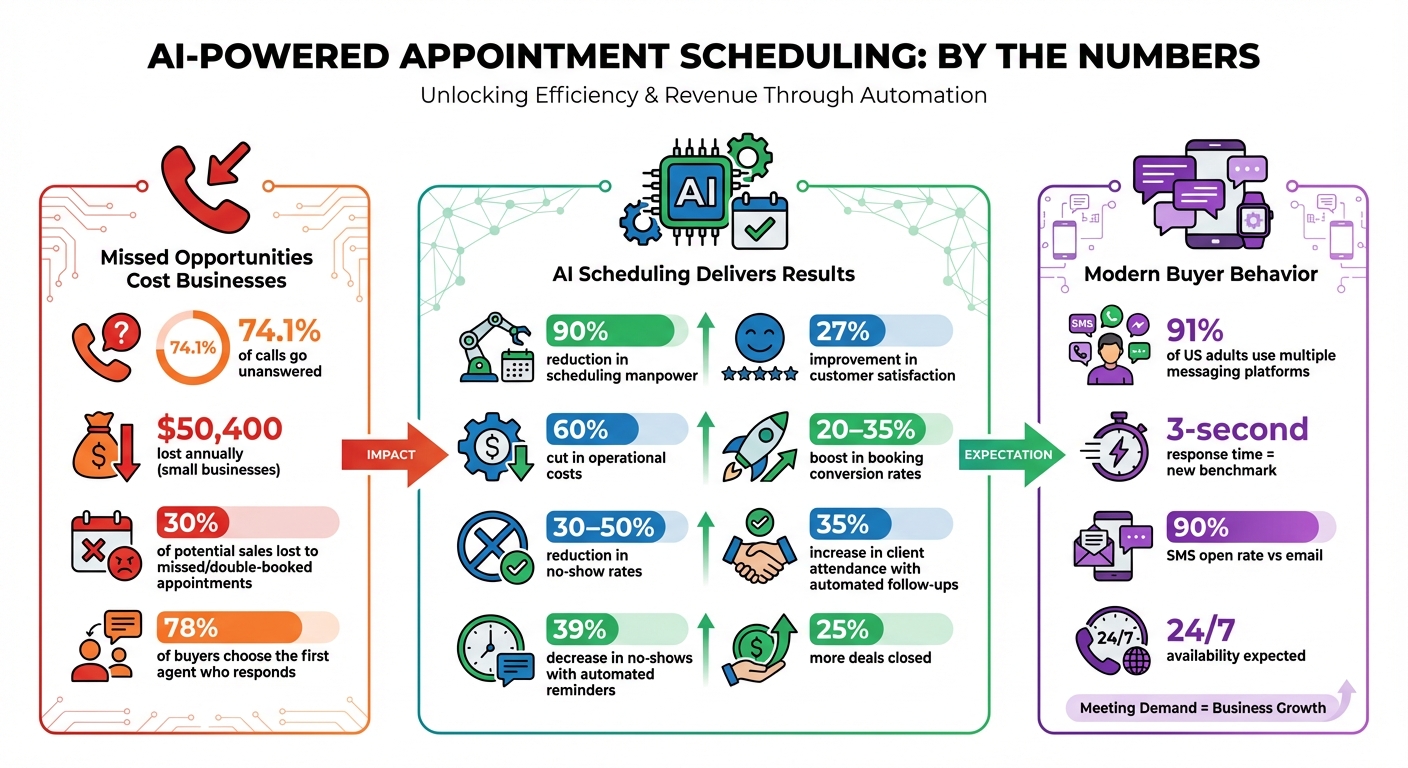 {AI Appointment Scheduling Impact: Key Statistics and ROI Metrics}
:::
{AI Appointment Scheduling Impact: Key Statistics and ROI Metrics}
:::
This AI Voice Agent Books Appointments While You Sleep (Sell this for $2,000+)
::: @iframe https://www.youtube.com/embed/6PnJT8vIGPU :::
Preparation Checklist for AI Scheduling Implementation
Start by analyzing how your team currently handles scheduling. Track the time spent on back-and-forth communication, updating calendars, and sending reminders. If you're losing up to 30% of potential sales because of missed or double-booked appointments, it's a clear sign your manual system isn't keeping up with modern demands[5]. Remember, today's buyers expect responses within minutes.
Next, identify the main channels your leads use to contact you. By 2024, 91% of US adults will rely on multiple messaging or social media platforms to reach businesses[5]. Your AI scheduling tool must be versatile enough to manage phone calls, texts, WhatsApp, Instagram DMs, website chats, and more - not just email. Determine which tasks can be fully automated, such as scheduling property tours, and which require human expertise, like addressing detailed financing questions[5][6].
Review Your Current Scheduling Process
Take a close look at your lead response times and pinpoint any bottlenecks in your scheduling workflow. If prospects are waiting hours for a callback, there's a good chance they're already engaging with your competitors. Also, make sure your compliance workflows are in order. From the start, your AI system must follow Fair Housing Laws and data privacy regulations[4][7].
Examine your no-show rates and cancellation trends. Are clients missing appointments due to forgetfulness or lack of confirmation? Automated reminders can reduce no-show rates by 39%[5], but only if you understand the root causes behind missed appointments. Use these insights to guide your choice of scheduling tools.
Choose the Right AI Scheduling Tool
When selecting an AI scheduler, look for platforms that use natural language processing (NLP) to interpret intent and learn from past interactions[4]. For real estate professionals, it's especially important to choose tools that integrate with MLS databases and CRMs. This eliminates the need to manually input the same property details multiple times.
One example is Oppy (https://oppy.pro), a scheduling tool designed specifically for real estate. It offers 24/7 AI assistance for lead qualification, scheduling, CRM integration, and compliance with buyer-broker commission consent laws. It also consolidates calls, texts, and client communication into a single platform.
Before committing to a tool, test its integration capabilities. It should sync seamlessly with tools like Google Calendar, Outlook, and CRMs such as Follow Up Boss or HubSpot - and it should do so in minutes, not weeks[6][2]. If you're a solo agent, a simpler tool may suffice. But for high-volume teams, advanced platforms with group scheduling and lead nurturing features are essential[2].
Set Up Appointment Types and Parameters
Once you've chosen your scheduling tool, take the time to configure it for maximum efficiency. Define specific appointment categories, such as residential showings or luxury consultations, and set appropriate durations with 15–30 minute buffers between bookings. Sync all calendars to prevent double-bookings and create urgency by limiting available slots to just the next 2–3 days[2][6].
Additionally, upload local insights - like neighborhood statistics, school district ratings, and market trends - so your AI assistant can provide accurate, property-specific answers during the booking process[5][4]. This ensures your scheduling system not only saves time but also adds value to client interactions.
Implementation Checklist for AI Scheduling
Connect with Existing Systems
Once your AI scheduling tool is ready, the next step is integrating it with your existing systems to ensure a smooth data flow. Sync it with your CRM, calendar, and MLS systems using native API connections. Set up a bi-directional calendar sync and use visual workflow tools to automatically transfer AI-captured data - like budget, pre-approval status, and preferred neighborhoods - into your CRM’s custom fields [8][10]. This integration eliminates manual data entry, logs every lead interaction instantly, and factors in buffer periods and travel time between appointments.
Don’t forget to configure triggers for human handoffs. For example, if the AI identifies a pre-approved buyer ready for a showing, it should immediately send an SMS alert or transfer the call to an agent. Considering that 78% of buyers go with the first agent who responds [9], these triggers can be game-changers in securing deals.
For a smoother integration process, tools like Oppy offer pre-built connections, allowing real estate professionals to focus more on client relationships instead of technical hurdles.
Configure Automated Notifications
After integrating your systems, make sure your AI tool communicates effectively with clients through automated notifications. Start by sending instant booking confirmations via SMS or email to establish trust right away [5]. Follow up with reminders 24 hours before the appointment and again on the morning of the showing. This strategy has been shown to reduce no-show rates by 39% [5].
Use multiple communication channels - such as SMS, WhatsApp, Instagram, and email - to ensure you’re reaching clients where they’re most active. Personalize each message with details like the property address, parking instructions, and your contact information. Add a simple two-way confirmation option, like “Reply 1 to confirm or 2 to reschedule,” to help you stay informed if plans change [1].
Turn On Instant Booking and Lead Capture
To maximize availability, enable features that allow for real-time lead capture. Activate 24/7 booking so you can capture leads even outside of traditional business hours [1]. This is especially important in real estate, where buyers often browse listings during evenings or weekends. Connect your AI scheduler to all client-facing platforms, including website chat, social media direct messages (like WhatsApp, Instagram, and Facebook Messenger), and even QR codes to initiate instant chats. This ensures no lead slips through the cracks [5].
Incorporate urgency detection to handle same-day or emergency inquiries. For instance, if a buyer messages, “Can I see this property today?”, the AI should either book the appointment immediately or escalate it for quick follow-up. Also, set mandatory buffer times - 15 to 30 minutes between appointments - to account for travel and property preparation [1][2].
Optimization Checklist for AI Scheduling
Add Buffer Times and Rescheduling Options
A well-planned schedule includes buffer times to keep things running smoothly. After launching your scheduling system, fine-tune these buffers to maintain a professional and stress-free experience. Your AI can automatically add short breaks between appointments, preventing one delay from derailing your entire day. As Schedly puts it, "When clients see that we are organized and respectful of their time, it builds trust and confidence in our abilities" [12].
Buffer times do more than prevent overlap - they help conserve energy and reduce stress. Pair this with self-service rescheduling to minimize no-shows. With 24/7 options, clients can adjust appointments instantly through SMS or chat, without waiting for office hours. Including one-click rescheduling links in reminder messages makes it easy for clients to rebook, turning potential no-shows into confirmed appointments.
Once your scheduling is seamless, focus on keeping clients engaged after their visit.
Set Up Automated Follow-Ups
Post-appointment follow-ups are a great way to stay connected with clients and provide extra value. Set up your AI to send more than just a thank-you note. For example, after a property showing, follow up with messages featuring relevant listings or updates about the neighborhood market.
Use SMS for urgent updates since it boasts a 90% open rate, and rely on email for more detailed follow-ups [13]. A strong follow-up plan might include 5–6 phone calls, 4–5 texts, and 4–5 emails over a 10-day period to maximize conversions [13].
The effort pays off. Matt McCaffer, Sales Director at SaaS Academy, shared: "We've closed over 100K in incremental revenue that essentially would have been lost. And the time required to get those meetings back on the calendar - for my team - was essentially 0" [2]. Automated follow-ups can recover lost opportunities without adding to your workload.
Monitor Performance Metrics
To improve your scheduling and follow-up strategies, you need to track performance. Metrics like booking conversion rates, no-show rates, and after-hours activity provide valuable insights. For instance, 24/7 AI availability can boost booking conversion rates by 20–35% [11]. Similarly, tracking no-show rates allows you to tweak reminder strategies to reduce missed appointments.
Don’t overlook after-hours performance - measure how many bookings occur outside standard business hours. Another key metric is speed to lead. Aim for automated responses within 5 minutes, especially in industries like real estate, where 78% of buyers go with the first agent who responds [9].
Regularly reviewing these metrics helps you refine your AI system. Tools like Oppy offer built-in dashboards for easy tracking, enabling you to make data-driven adjustments instead of relying on guesswork. This ensures your scheduling process stays efficient and effective.
Advanced AI Scheduling Applications
AI scheduling tools go beyond simply managing calendars - they can help boost revenue and ensure your operations run smoothly.
Use AI for Upselling Opportunities
AI scheduling isn’t just about setting appointments; it’s also a smart way to identify and maximize revenue opportunities. These tools analyze data to highlight high-value prospects, ensuring your focus stays on the most profitable leads [3]. For example, when a client schedules an appointment, the AI can suggest relevant add-ons that enhance their experience and increase your revenue.
You can also customize your AI scheduler with business-specific FAQs, enabling it to deliver natural, trust-building responses [4]. Over time, these systems learn user behavior and adjust settings based on past interactions, making the process feel increasingly personal and efficient [4].
Maintain Compliance and Team Visibility
AI systems can help ensure your business stays compliant with regulations like the 2025 NAR ethics and Fair Housing Laws. To reduce risk, set up your AI tools to automatically remove client data once it’s no longer needed [4].
For better team collaboration, integrate your scheduling AI with a central CRM. This allows everyone to view lead statuses and appointment histories in real time [2][6]. Additionally, syncing multiple calendars prevents double bookings, while instant notifications about appointment changes keep the team aligned and informed [2].
Test, Refine, and Scale
Start small to fine-tune your AI scheduling processes. For instance, test a single workflow - like responding to online leads - with a small group of agents (5–15) and a couple of admins. This approach allows you to identify and resolve any issues without disrupting your entire operation [14].
Once your pilot program delivers results, gradually expand. As David Pitta, Chief Marketing Officer, noted:
In that first quarter alone, we won $500,000 we never would have realized otherwise.
Experiment with various appointment types, notification templates, and follow-up strategies to find the best fit for your audience and goals [2]. Scaling thoughtfully ensures your AI scheduling system continues to deliver value as your business grows.
Conclusion
AI-powered scheduling is transforming how businesses manage appointments. By eliminating manual errors, reducing no-shows by up to 39% [5], and cutting scheduling manpower by 90%, it slashes operational costs by 60% while improving customer satisfaction by 27% [2]. This shift allows agents to focus more on building client relationships.
To achieve these results, adopting precise and efficient scheduling practices is key. Start by evaluating your current processes and selecting tools that integrate smoothly with your CRM and calendar systems. Features like automated reminders, buffer times, and follow-up sequences can make a big difference - just automating post-booking outreach can increase client attendance rates by 35% [5]. Additionally, configuring your AI with local market insights and routinely monitoring its performance ensures compliance with Fair Housing Laws and preserves your brand’s tone [4][5].
As Luke Babich, CEO and Co-founder of Clever Real Estate, explains: "Nothing replaces a firm handshake and a warm smile, but utilizing AI tools to schedule appointments and answer questions gives you more time to focus on the human side of each client interaction" [4].
The real estate industry is evolving quickly, with 3-second response times emerging as the new benchmark [6]. Start small with a pilot program, refine your approach, and then scale up. Agents who integrate AI scheduling today are positioning themselves to close 25% more deals tomorrow [2]. Now is the time to act - implementing these strategies will help you stay ahead in a competitive market.
FAQs
::: faq
How do I know if AI scheduling is worth it for my real estate business?
AI scheduling offers a practical way to simplify workflows, boost client interaction, and grow your business. It takes care of tasks like booking appointments and sending follow-ups automatically, ensuring round-the-clock availability. This not only saves you time to focus on more important tasks but also improves efficiency and keeps clients happy. In the fast-moving real estate world, AI scheduling helps you stay ahead by letting you concentrate on securing deals. :::
::: faq
What should I integrate first - calendar, CRM, or MLS?
To get started with AI-powered appointment scheduling in real estate, the first step is to sync your calendar. This ensures real-time updates and helps prevent double-bookings, which is essential for smooth scheduling.
Once your calendar is connected, the next step is integrating your CRM to manage leads effectively and linking your MLS for accurate property data. Taking these steps in order sets a strong foundation for reliable scheduling before moving on to automating your entire workflow. :::
::: faq
How do I keep AI scheduling compliant with Fair Housing and privacy rules?
To stay aligned with Fair Housing and privacy rules, it's essential to take proactive steps when managing AI systems. Start by conducting regular audits to identify and address potential biases in the system. This ensures that your AI remains impartial and compliant with regulations.
Make sure all communication aligns with state-specific disclosure requirements. This helps maintain transparency and builds trust with clients. Additionally, protect client data by adhering to privacy standards such as the California Consumer Privacy Act (CCPA).
It's also important to test AI-generated responses for accuracy and document all compliance checks. These records not only demonstrate your commitment to ethical practices but also safeguard against discriminatory outcomes. By following these steps, you can ensure your AI-powered scheduling remains both fair and secure. :::