Improving Lead Conversion with Faster Response Times
Improving Lead Conversion with Faster Response Times
Want to close more real estate deals? Start responding to leads faster. Studies show that replying to inquiries within 5 minutes makes you 21x more likely to qualify a lead compared to waiting 30 minutes. In fact, 78% of buyers work with the first agent who replies. Yet, the average response time in real estate is a staggering 47 hours, leaving massive opportunities on the table.
Here’s why speed matters and how to fix slow response times:
- Leads lose interest fast: Quality drops 80% after 5 minutes.
- Missed revenue: Agents responding in under 5 minutes can earn $432,000 more annually than those waiting hours.
- AI tools solve the problem: Platforms like Oppy respond in seconds, 24/7, ensuring no lead goes unanswered.
If you’re tired of losing leads to faster competitors, faster response times are your solution. Ready to learn how? Keep reading.
::: @figure 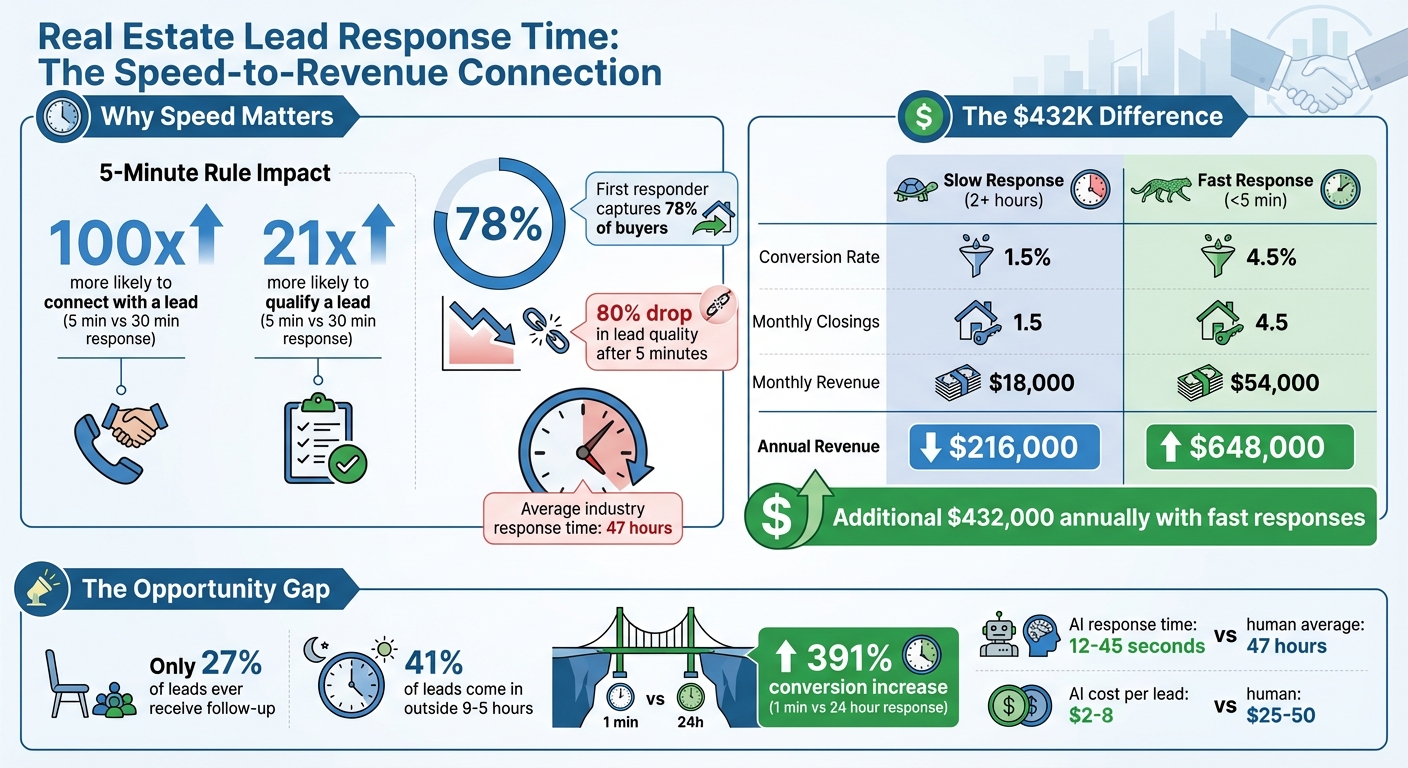 {Real Estate Lead Response Time Statistics and Revenue Impact}
:::
{Real Estate Lead Response Time Statistics and Revenue Impact}
:::
Understanding the 5-Minute Rule
The Research Behind the 5-Minute Rule
The 5-minute rule is simple: reach out to an inbound lead within five minutes of their inquiry to maximize your chances of converting them into a customer[7]. And there’s plenty of data to back this up.
Responding within five minutes makes you 100 times more likely to connect with a lead and 21 times more likely to qualify them compared to waiting just 30 minutes[6][1]. Dr. James Oldroyd from MIT summed it up perfectly:
"The odds of contacting a lead decrease by 100 times if you wait 30 minutes versus 5 minutes." [7]
Why does speed matter so much? It’s about meeting prospects when their interest is at its peak. After filling out a contact form, they’re actively seeking solutions. But with the average person switching digital tasks every 47 seconds[8], the quality of a lead drops by 80% after just five minutes[6].
A mid-sized real estate brokerage proved how impactful fast responses can be. By switching from manual callbacks (which averaged 47 minutes) to AI-powered auto-texts that responded in under two minutes, they saw a 400% increase in appointments and doubled their close rates within 60 days[2]. Another study revealed that only two agents in a group managed to respond within a critical four-minute window, while nearly half (48%) of inquiries went completely unanswered[5].
The takeaway? Quick responses don’t just improve engagement - they directly influence your bottom line.
Revenue Impact of Faster Responses
Fast response times can lead to massive revenue gains. Let’s break it down with an example. Imagine a real estate business receiving 100 leads per month, with an average commission of $12,000 per closing:
| Response Speed | Conversion Rate | Monthly Closings | Monthly Revenue | Annual Revenue |
|---|---|---|---|---|
| Slow (2+ hours) | 1.5% | 1.5 | $18,000 | $216,000 |
| Fast (< 5 minutes) | 4.5% | 4.5 | $54,000 | $648,000 |
The difference? An additional $36,000 per month or $432,000 annually[1]. Delayed responses don’t just mean missed opportunities - they result in actual dollars lost. For every dollar spent on acquiring leads, agents could lose $0.73 due to slow or nonexistent follow-ups[1]. On top of that, each missed lead could represent a potential loss of $7,500 or more in commission income[4].
And here’s the kicker: only 27% of real estate leads ever receive any follow-up from an agent[1]. Those who act fast - responding within the first minute - can see conversion rates jump by as much as 391% compared to waiting 24 hours[1].
sbb-itb-a4dc1bd
Using Technology to Improve Response Times
AI-Powered Assistants for Real Estate
Did you know that real estate agents, on average, take 47 hours to respond to new leads[3]? That’s nearly two full days! AI-powered assistants are changing the game, slashing response times to just 12 to 45 seconds on average[1]. In some cases, these systems can respond in as little as 3.5 seconds[9].
One of the biggest advantages? These tools work 24/7, addressing the 41% of leads that come in outside the typical 9-to-5 work hours[1]. Many advanced systems use a dual-agent setup: a Main Agent handles conversations while an Assistant Agent analyzes behavioral patterns, like mentions of relocation or repeated views of a property, to determine urgency[10]. The moment a lead submits an inquiry, the system can launch a three-touch sequence - an AI-driven voice call, SMS, and email - all within 60 seconds[3].
And the cost savings are just as impressive. AI engagement costs only $2–$8 per lead, compared to $25–$50 for human follow-ups[1]. Teams that combine AI with human follow-ups see 34% more leads converted than using either approach alone[1]. For example, Oppy's AI virtual assistant takes automation even further by syncing directly with your calendar, allowing prospects to schedule showings instantly - no back-and-forth emails required[9][3].
Tracking Response Times with Analytics
Quick response times are great, but how do you ensure they stay consistent? That’s where analytics come in. You can’t improve what you don’t measure. Response time analytics help identify bottlenecks, like delays during peak inquiry times or overlooked leads from specific sources. Research shows that responding within 60 seconds can increase lead-to-appointment conversions by 55% compared to waiting just five minutes[3].
Modern platforms offer real-time dashboards that track response times, contact rates, and conversion metrics. This visibility lets you set clear Service Level Agreements (SLAs) - like committing to respond to every inquiry within five minutes - and monitor team compliance automatically[2]. Analytics can also help you allocate resources more effectively, showing which lead sources deliver the best results with rapid engagement. Plus, they highlight when leads are arriving during evenings or weekends, pinpointing where automation can make the biggest impact[1].
How to Use Oppy for Instant Lead Responses
Setting Up Oppy for Your Business
Oppy makes instant lead engagement a reality, and setting it up is straightforward. Start by connecting your CRM. Oppy integrates seamlessly with platforms like Follow Up Boss and supports Google Calendar, making lead management and scheduling a breeze[9]. This integration ensures leads are captured and addressed immediately, reinforcing the critical "5-minute rule" mentioned earlier.
Next, enable the phone calling feature, introduced in October 2025. This allows Oppy to make voice calls as soon as a lead inquires, ensuring no opportunity slips through the cracks[9]. Take the time to configure compliance settings, so Oppy can automatically address buyer-broker agreements, keeping you aligned with 2025 NAR ethics and Fair Housing laws[9]. For a personal touch, customize your virtual assistant’s name and tone to reflect your brand’s identity.
Once your setup is complete, you’ll be ready to explore how Oppy's features can transform your lead conversion process.
Getting the Most from Oppy's Features
Oppy’s true strength lies in how its features work together. With 24/7 availability, Oppy ensures you never miss a lead. Considering that 41% of leads come in outside regular business hours, Oppy responds instantly via the prospect's preferred channel - whether that’s text, email, or phone[1].
Before engaging with a lead, check Oppy’s smart summaries. These briefings give you a quick overview of prior interactions, so you’re always prepared[9]. With a lead qualification accuracy of 85-92%[1] and 78% of buyers choosing the first agent who responds[1], Oppy helps you stay ahead. As Prestyj highlights, the winning formula is simple: use AI to respond and qualify leads instantly, then rely on your expertise to build relationships and close deals[1].
For businesses of all sizes, Oppy’s API access offers flexibility to tailor workflows to your needs[9]. Whether you’re an individual agent or managing a team, Oppy turns speed and precision into your competitive edge.
Monitoring and Improving Response Performance
Using Analytics to Track Performance
With Oppy's automated tracking tools, keeping tabs on your response metrics becomes straightforward. Once Oppy is managing your lead responses, focus on key metrics to identify strengths and areas for improvement. Start by analyzing your Average Response Time (ART) and the percentage of leads contacted within the crucial 1-minute and 5-minute windows. Here's why this matters: responding within 1 minute leads to a 78% qualification rate, but if you wait an hour, that rate drops sharply to 22% [3].
Your dashboard should also provide insights into your Contact Rate - the proportion of leads you successfully connect with - and your Lead-to-Appointment Rate, which shows how many qualified conversations turn into scheduled meetings. These metrics are essential for understanding the effectiveness of your outreach.
Don't overlook financial metrics either. Keep an eye on your Cost Per Lead (CPL) and ROI per lead source to determine which channels bring in the best returns. This data can spotlight any gaps in your strategy and help you allocate resources more effectively.
Set clear goals to measure your success: aim to contact over 90% of leads within 1 minute, maintain a contact rate above 70%, and achieve a lead-to-appointment rate of at least 20% [3]. These benchmarks provide a solid foundation for assessing your performance. From there, refine your strategy with targeted testing to push those numbers even higher.
Testing and Refining Your Response Strategy
Once you've established your performance analytics, the next step is continuous improvement through structured testing. A 6-week testing cycle can help you fine-tune your approach. Here's how it works: spend the first two weeks gathering baseline metrics, the next two weeks testing a single variable - like whether SMS or phone calls yield better results - and the final two weeks analyzing the outcomes [12]. Testing one variable at a time ensures clarity in identifying what works.
"The race isn't to have the best product or the slickest pitch. It's to show up before anyone else does. Speed is the new competitive moat." - Nadeem Azam, Founder, Rep [11]
Want to see where you stand in the market? Try mystery shopping by submitting inquiries to other agents in your area. Observe how quickly they respond and the quality of their follow-up. This benchmarking can reveal how competitive your response times and strategies are, helping you stay in the top 2% of responders [3].
Another valuable tactic is gathering feedback directly from your leads. Use post-call surveys to learn how your response time measures up to their expectations - 82% of prospects are willing to share this information [12]. Their insights can guide refinements to your approach, ensuring you maintain a strong edge in your market.
How To Automate Real Estate Lead Follow Up - Never Miss A Deal Again
::: @iframe https://www.youtube.com/embed/1VwM0aBeMJY :::
Conclusion
In real estate, speed is everything. Responding to inquiries within the first minute can boost conversions by a staggering 391% compared to waiting 24 hours [1]. Even more compelling, the first responder captures 78% of buyers [1]. Yet, the industry’s average response time lags at about 47 hours [1], leaving a massive opportunity for agents willing to act faster.
The real hurdle? Consistency. With 62% of inquiries coming in after regular business hours [4], relying solely on manual follow-ups won’t cut it. That’s where AI-powered tools like Oppy step in. These tools handle responses instantly, qualify leads 24/7, and notify you only when a high-intent prospect needs your attention. By automating this process, you eliminate the limitations of manual efforts and position yourself to stay ahead.
Adopting the "Platinum Minute" standard [11] instead of the traditional 5-minute rule is more than a strategy shift - it’s a game-changer. As Nadeem Azam, Founder of Rep, explains:
"Speed is the new competitive moat - and my bet is it's only going to intensify" [11].
Agents who adapt to this reality and use automation to achieve sub-minute response times will gain a powerful edge in their markets.
FAQs
::: faq
What counts as a “response” within the 5-minute rule?
A "response" in the context of the 5-minute rule refers to any immediate action taken to contact a lead after they show interest. This could be through a call, email, or text message. The goal is to engage the lead as quickly as possible. Responding promptly plays a key role in boosting both lead conversion rates and client retention. :::
::: faq
Which response-time metrics should I track first?
One of the first things to measure is how quickly you respond to new leads - especially during the crucial first five minutes. Research reveals that responding within this short window can make your chances of converting a lead up to 21 times more effective.
Start by monitoring the time it takes from when a lead first reaches out to when you respond. This simple step can highlight any delays in your process. Identifying and fixing these gaps helps you engage with leads faster, which can have a big impact on your overall conversion rates. :::
::: faq
How can I use Oppy to keep sub-minute responses after hours?
Oppy’s AI-driven virtual assistant works around the clock, delivering responses in under a minute - even outside regular business hours. It’s designed to instantly engage prospects by capturing leads, answering questions, sharing property details, and scheduling appointments. Beyond that, it takes care of tasks like transcribing calls, drafting follow-ups, and updating contact information effortlessly. With its quick response times, it helps you connect with leads faster, boosting your chances of turning them into clients before they look elsewhere. :::